
When we talk about SaaS deployment sports clubs need, the plain reality is getting a software platform up and running so a facility can actually operate day to day. Instead of buying local physical servers and paying internal technical staff to run software on-site, you subscribe to a system that an outside provider builds, maintains, and secures in the cloud.
Three practical shifts happen as soon as you choose this route. First, upfront capital expenditure drops because there are no dedicated hardware servers or perpetual licenses to buy. Second, the time required to go live shrinks from several months down to weeks or days. Third, your team stops managing server patches and security updates entirely, because the vendor pushes maintenance overnight behind the scenes.
- Lower upfront spend: You avoid five-figure hardware outlays and perpetual software licenses in exchange for an ongoing subscription.
- Faster rollout: Cloud platforms launch in four to eight weeks rather than the six to twelve months common with custom on-premises projects.
- Offloaded security: System patching, server backups, and database uptime stay the software provider's responsibility.
How SaaS Deployment Works for Sports Clubs, Step by Step
Every credible deployment follows roughly the same sequence, whether you manage two padel courts or a twelve-court tennis and pickleball facility. Knowing the deployment order ahead of time allows you to show up to vendor onboarding calls with clean data and defined requirements instead of guessing in real time.
- Pre-purchase discovery: Define your operational baseline across court reservations, payment gateways, membership tiers, coach schedules, and match play tools. Gather every current record source, including spreadsheets or legacy databases, and document bar or pro-shop point-of-sale systems that must connect.
- Contract and account setup: Establish your subscription tier and account architecture. Multi-facility operations usually run a master organization account with segmented venue subaccounts, which keeps administrative permissions separated between front-desk staff, teaching pros, and directors.
- Configuration and data import: Load member contact records, court availability grids, and custom pricing schedules through bulk file imports, while establishing API connections for card processing and external calendars.
- Pilot testing: Run a controlled trial on one or two courts with a dedicated coach or player group before opening access to the wider roster, fixing scheduling conflicts while transaction volume remains manageable.
- Go-live and verification: Open the system across all courts, balance transaction totals through the first week, confirm user permission boundaries, and monitor reservations daily for booking friction.
Run your initial pilot during a quiet mid-week period rather than during a weekend member-guest tournament. An unexpected booking conflict on a quiet Tuesday morning is an easy adjustment, whereas that same glitch during a club championship creates immediate administrative chaos.
Timeline and Costs: What to Budget For
Planning, discovery calls, and contract review typically take one to two weeks. Data formatting and platform configuration take an additional one to three weeks depending on how disorganized your current membership spreadsheets happen to be. A focused pilot phase requires one to two weeks, meaning full facility rollouts usually take four to eight weeks from kickoff.
Financial commitments depend directly on operational depth across three distinct tiers. For basic court scheduling, a simple entry-level system costs between $1,200 and $3,000 per year with minimal or included setup fees, providing a basic court reservation grid and rudimentary player check-in. Stepping up to a standard club setup requires budgeting between $25,000 and $30,000 per year alongside roughly a 10% management fee, which unlocks dynamic pricing, coach scheduling, clinics, social play, and member billing. If you operate an enterprise platform, you are looking at a six-figure build sum with a ~10% management fee to secure dedicated white-label apps, player ratings, tournament ladders, and custom match engines.
For most established facilities, operational reality requires structured pricing windows, distinct operating hours, player matchmaking, coaching rosters, and in-app clinic registration. Large enterprise operators wanting native mobile applications, integrated rating systems, and dedicated tournament management can easily see custom builds cross into large six-figure amounts.
Data migration and integrations you need to plan for
Most club managers underestimate how much deployment effort centers on cleaning legacy data rather than adjusting user settings in the software. Essential connection points routinely include credit card payment gateways, digital staff calendars, pro-shop registers, accounting ledgers, and player matchmaking feeds.
Successful data transfer follows a structured routine: extract current records, standardize phone numbers and member identifiers, match columns to the incoming schema, import test batches, and verify balance totals against your historical system before cutting over. Simple member contact files migrate easily. Historical payment ledgers and credit balances present far more friction because naming structures between legacy databases and modern cloud systems rarely align.
- Payment gateways and registers: Connect point-of-sale hardware and online processors for unified member billing.
- Calendar synchronization: Link coaching rotas directly with court reservation availability to prevent double bookings.
- Financial exports: Route nightly transactions directly into accounting software to reduce bookkeeping reconciliation hours.
- Matchmaking tools: Sync active player rosters with club ladders and competitive leagues.
Live API webhooks update court availability instantaneously across calendars, whereas high-volume historical financial archives can synchronize on scheduled overnight batches. Run dummy transactions through your live merchant gateway prior to public launch, because a declined payment or duplicate charge during opening week damages member confidence far more than an extra week spent testing.
Security, access and data ownership: what to insist on in your contract
Modern SaaS systems rely on multi-tenant architecture, meaning several clubs run on shared underlying infrastructure while security rules keep each facility's data isolated. You should ask your provider to explain exactly how database isolation works, how role-based permissions are enforced, how encryption functions at rest and in transit, and how frequently patches deploy.
Four contractual commitments protect your club's operational independence:
- Unconditional data ownership: Your member lists, court booking logs, and transaction records remain your exclusive property rather than the vendor's.
- Clean data portability: You must retain the right to export full relational databases in universal formats at any point without exit penalties.
- Defined backup retention: Backup intervals and incident disclosure timelines must appear as specific day counts in writing rather than vague best-effort promises.
- Enforceable service agreements: Explicit uptime guarantees and technical support turnaround times must carry defined remedies for extended downtime.
Clarify in writing who among the vendor's support staff can view your membership files, how long off-site disaster backups remain stored, and the exact timetable for security incident notifications.
Training staff, coaches and members without the pushback
The hardest part of any deployment is getting human beings to adjust their daily habits. System adoption succeeds when facilities introduce high-frequency features first, giving players and front-desk staff immediate confidence before rolling out complex administrative tools.
Begin strictly with court reservations and payment processing, because those are the touchpoints your community uses every single week. Once those core functions feel natural and unremarkable, activate group clinic signups, coaching diaries, competitive ladders, and management reporting.
Training should start with targeted two-minute screen recordings showing members how to reserve courts and pay balances from a phone, backed by a concise launch email explaining login credentials. For staff, hands-on clubhouse walkthroughs must focus on processing cancellations, collecting guest fees, and managing walk-ins, while teaching pros need only learn to view daily rosters and log private lesson schedules.
A concise introductory email, a reminder three days before switchover, and short visual guides during the initial fortnight will handle most user resistance. Avoid flooding members with lengthy guides explaining advanced features they will not need for months.
Measuring success: the KPIs that actually matter
Once your platform is active, monitor court utilization percentages, active player adoption rates, revenue per available court hour, no-show frequency, and the hours administrative staff spend reconciling weekly statements.
Evaluate these operational indicators weekly throughout your first month, when workflow friction surfaces quickly. Switch to monthly reviews as booking behavior settles into steady patterns, and conduct thorough quarterly operational assessments. If historical reservation data reveals persistent prime-time court waitlists, you have a clear business justification to activate automated waitlist tools rather than guessing what players want.

What Most Deployment Advice Gets Wrong
Most software guidance treats system deployment as a mechanical checklist: select a platform, transfer contact records, and flip the switch overnight. That assumption overlooks the actual factor determining club success: pacing the rollout around player habits rather than management's desire to finish the project.
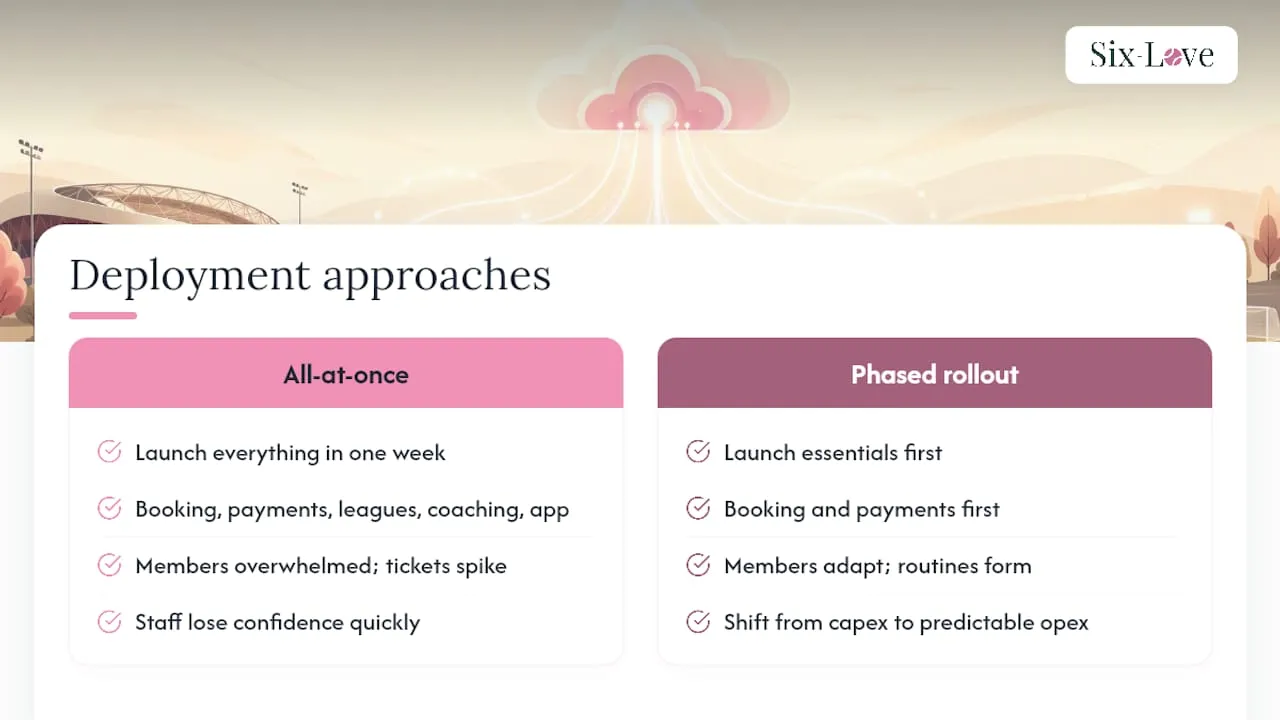
Clubs that run into trouble frequently attempt to launch every module simultaneously. They turn on court bookings, member dues, league ladders, coach rotas, and an unfamiliar mobile app within the same week. Players get confused, phone lines jam with login questions, and staff abandon the new workflow before it has an opportunity to function. Operators who run smooth deployments launch court bookings and payments first. They wait until those core transactions become second nature before introducing competitive leagues or secondary tools.
Another frequent miscalculation is assuming deployment is a plug-and-play process that wraps up in an afternoon. Sales reps love to tell club boards that setup requires zero effort, but in-depth operations always require configuring unique cancellation policies, guest rates, and court lighting controls.
Sources
- The hidden value of SaaS in sports streaming: beneath the tip of the iceberg | Synamedia
- SaaS vs on‑premises | Deltek

Recommended
- Migrating from manual booking systems: a club manager’s guide
- General · Six-Love Blog
- Features | Six Love – Club Management Tools
Key Takeaways
Rolling out a cloud platform across a racket facility succeeds only when phased adoption, clean member records, and verified system security receive the same attention as the feature list itself.
Typical club rollouts take between four and eight weeks from signed agreement to full launch. Phased rollout dictates that you launch court reservations and core transactions first before introducing clinic schedules or tournaments. Real cost bands range from $1,200 to $3,000 per year for basic court scheduling up to $25,000 to $30,000 annually for standard clubs, with enterprise builds reaching six-figure sums with a ~10% management fee. Contract protections must confirm explicit data ownership, complete database portability, and defined breach notice windows.
Treating deployment as a superficial software switch rather than an operational transition is where facilities stumble. But if you need dynamic court pricing, player matchmaking, coach scheduling, and integrated clinic bookings, expect to budget between $25,000 and $30,000 per year with an approximate 10% management fee. Pushing into an enterprise system with custom rating systems and tournament engines pushes custom builds into six-figure sums. A modular platform delivers the bespoke operational fit of a custom build without the devastating bugs and massive capital outlay.
If you are ready to move your club away from messy spreadsheets and fragmented booking logs, your next move is to run a quick audit of your current member data before you talk to any sales reps. Clean your phone numbers, map out your actual peak court hours, and decide which two staff members will own the rollout. When you start vendor demos, skip the flashy feature lists and ask them directly about their data export format, their backup intervals, and how they handle historical payment records. Getting those three answers locked down in writing saves you from a messy migration six months down the line.
- Audit your data: Clean existing member contact records and export past booking sheets before your first vendor call.
- Start small: Launch court reservations and payment processing first, then add coaching rotas and leagues after your members get comfortable.
- Lock in contracts: Demand unconditional data ownership and defined backup retention terms in writing before signing any subscription agreement.
FAQ
What are the top software options for managing racket sports clubs?
The market divides between broad club systems like CourtReserve and Club Automation, consumer-facing booking marketplaces like Playtomic, and dedicated multi-sport platforms like Six Love that handle dynamic scheduling and clinic management.
How long does SaaS deployment take for a small racket club?
A single-site facility with clean member data can typically go live within four weeks, covering discovery, configuration, a short pilot and full roll-out.
What causes the most delays during a court booking software rollout?
Messy historical data migration and unaligned payment gateway integrations consistently stretch timelines further than software configuration itself. When a club attempts to import a decade of handwritten logs alongside multiple merchant accounts, unexpected field mismatches routinely push rollouts past the eight-week mark.